
Today's Website~
● Language Guide. org English
What is it about?
● It is a pictorial vocabulary guide to practice English and French.
Why is the content good for language learning?
● The pictorial vocabulary could be used for lower-level students (beginners).
● The teacher could choose a category and have students work in pair to move the cursor
on each picture, to practice pronunciation (speak out), to be familiar with the words and
the pictures.
● Once students are familiar with the vocabulary and its pronunciation, have them do the
quiz.
● The teachers can arrange some activities for students to use those words they learn.
For example, have them make sentences with 5 words, or make a story with the words
in the word category selected.
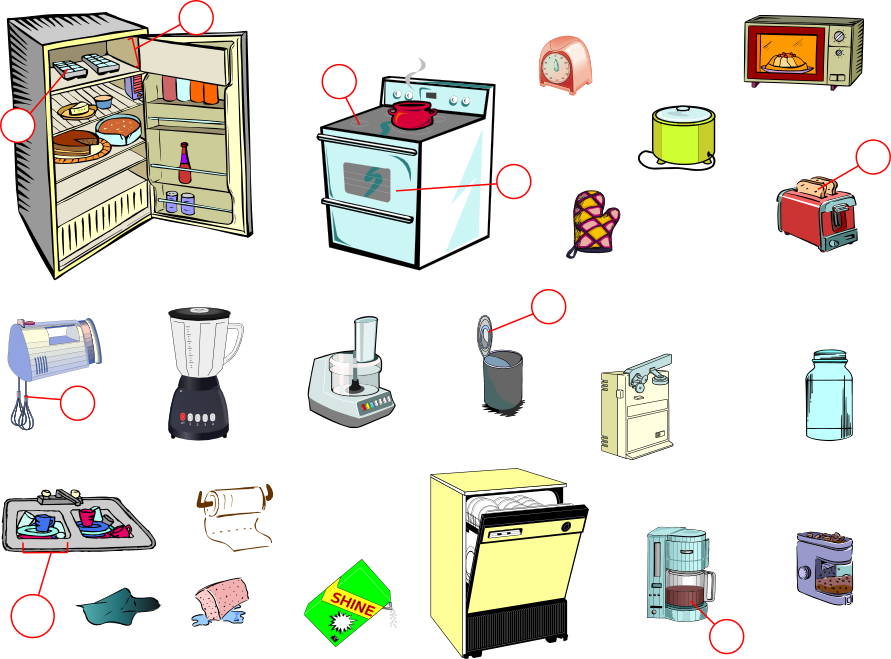
● For the beginners, take "the kitchen" for example, the teacher can have students
work in groups to arrange the utensils in their kitchen, drawn them in the handout
and write down the vocabulary beside them. The teacher can also teach the
position such as "next to, on the top of, under.." for students to make sentences
according to the arrangement.
Limitations~
● Language Guide. org English
 |
What is it about?
● It is a pictorial vocabulary guide to practice English and French.
● It provides taxonomy of vocabulary with images, pronunciation of the words, and
sounds (e.g. sounds of animals).
● It also provides an interactive quiz mode to check your understanding of the words
(listening, recognizing the words and their matched pictures).
● You can save the vocabulary you are unfamiliar in your account.
sounds (e.g. sounds of animals).
● It also provides an interactive quiz mode to check your understanding of the words
(listening, recognizing the words and their matched pictures).
● You can save the vocabulary you are unfamiliar in your account.
Why is the content good for language learning?
● Pictures and sounds help learners to link the words and their meanings more easily.
● It is interactive. Students can choose whatever they are unfamiliar and practice as
many times as they like.
● The pronunciation is clear.
many times as they like.
● The pronunciation is clear.
● It provides quiz to check on learners' listening/vocabulary comprehension
● Learners can save the words (unfamiliar ones) they want to review into their account.
● Learners can save the words (unfamiliar ones) they want to review into their account.
How might you use it in a language teaching context?
● The pictorial vocabulary could be used for lower-level students (beginners).
● The teacher could choose a category and have students work in pair to move the cursor
on each picture, to practice pronunciation (speak out), to be familiar with the words and
the pictures.
● Once students are familiar with the vocabulary and its pronunciation, have them do the
quiz.
● The teachers can arrange some activities for students to use those words they learn.
For example, have them make sentences with 5 words, or make a story with the words
in the word category selected.
● For the beginners, take "the kitchen" for example, the teacher can have students
work in groups to arrange the utensils in their kitchen, drawn them in the handout
and write down the vocabulary beside them. The teacher can also teach the
position such as "next to, on the top of, under.." for students to make sentences
according to the arrangement.
 |
| The Kitchen |
● Have to scroll up and down to practice vocabulary, or click on the correct words when
choosing "Quiz Mode".
● It doesn't open in another window automatically, so you will always click "Home" to go
to the main page to choose another category to practice.
choosing "Quiz Mode".
● It doesn't open in another window automatically, so you will always click "Home" to go
to the main page to choose another category to practice.
● Some categories, such as "Men's Clothing", "Women's Clothing" and "Numbers", are
not working in English version, but in Chinese version, they could be shown.
● Even if you save unfamiliar words in your account, they do not provide the link of each
word for learners to check it out, or review the words. Might take some time to find where
the words are.
● The levels are not clear. Some are easy, and some are difficult. The teachers will have to
select appropriate ones that is suitable for students in their learning context.
● It (The beep sound) could be demotivating if students do not answer correctly.
The feedback of the quizzes could be "Nice try! But this one is 'an oven'".
● The teachers should make sure the quizzes are made appropriately in case of washback.
(e.g. the pictures are not shown clearly when students want to click the right answers)
● The teacher should arrange some activities for students to use the words they learn.
----------------------------------------------------------------------------------------------------------------------------------
Example~
● Choose the category you would like your students to learn.
● Choose the category you would like your students to learn.
 |
| Choose the category. |
● Move the cursor to listen the pronunciation of each words. The spelling of the word is
also shown on the screen.
 |
| the word "pound sign" |
● You can also learn the sounds of the animals.
 |
| the sound of donkey "bray" |
● Try the "Quiz Mode". You can click on the "speaker" sign to listen again.
 |
| Listen and click on the picture. |
 |
| The hint "volcano" is shown. |
● You can save the words you are unfamiliar with into your account.
 |
| Click on "Save to account". |
● The saved words in your account.
 |
| the saved words |


