Welcome

Apply ICT in English Teaching in the real classroom- Please click on Fu-Fong English Speciality Bloggar

(Fu-Fong Junior High School, Taoyuan, Taiwan)

ICT運用於英語教學上,請參閱福豐國中英資換發部落格(學生發表、合作學習的部落格)

http://fufonges.blogspot.tw/

Showing posts with label Vocabulary. Show all posts

Friday, 4 February 2011

Language Guide. org English- Vocabulary Learning for Beginners

Today's Website~

●    Language Guide. org English


What is it about?

●  It is a pictorial vocabulary guide to practice English and French. 

●  It provides taxonomy of vocabulary with images, pronunciation of the words, and

    sounds (e.g. sounds of animals).

●  It also provides an interactive quiz mode to check your understanding of the words

    (listening, recognizing the words and their matched pictures).

●  You can save the vocabulary you are unfamiliar in your account.

Why is the content good for language learning?

●  Pictures and sounds help learners to link the words and their meanings more easily.

●  It is interactive.  Students can choose whatever they are unfamiliar and practice as

    many times as they like.

●  The pronunciation is clear.

●  It provides quiz to check on learners' listening/vocabulary comprehension

●  Learners can save the words (unfamiliar ones) they want to review into their account.
 
How might you use it in a language teaching context?

●  The pictorial vocabulary could be used for lower-level students (beginners). 

●  The teacher could choose a category and have students work in pair to move the cursor 

    on each picture, to practice pronunciation (speak out), to be familiar with the words and 

    the pictures.

●  Once students are familiar with the vocabulary and its pronunciation, have them do the 
    
    quiz.

●  The teachers can arrange some activities for students to use those words they learn.

    For example, have them make sentences with 5 words, or make a story with the words

    in the word category selected.

●  For the beginners, take "the kitchen" for example, the teacher can have students

    work in groups to arrange the utensils in their kitchen, drawn them in the handout 

    and write down the vocabulary beside them.  The teacher can also teach the 

    position such as "next to, on the top of, under.." for students to make sentences 

    according to the arrangement.
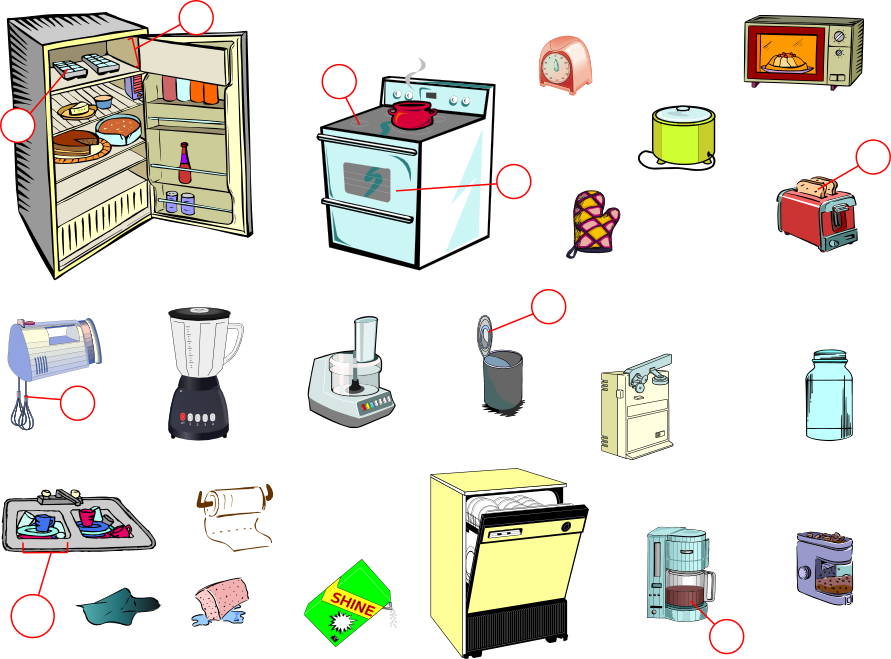

The Kitchen
Limitations~
  
●  Have to scroll up and down to practice vocabulary, or click on the correct words when 

    choosing "Quiz Mode".

●  It doesn't open in another window automatically, so you will always click "Home" to go

    to the main page to choose another category to practice. 

●  In some category, there is a quick link tab on the bottom, but in some, there is none.
 
●  Some categories, such as "Men's Clothing", "Women's Clothing" and "Numbers", are

    not working in English version, but in Chinese version, they could be shown.

●  Even if you save unfamiliar words in your account, they do not provide the link of each 

    word for learners to check it out, or review the words.  Might take some time to find where

    the words are.

●  The levels are not clear.  Some are easy, and some are difficult.  The teachers will have to

    select appropriate ones that is suitable for students in their learning context.

●  It (The beep sound) could be demotivating if students do not answer correctly. 

    The feedback of the quizzes could be "Nice try!  But this one is 'an oven'".

●  The teachers should make sure the quizzes are made appropriately in case of washback. 

    (e.g. the pictures are not shown clearly when students want to click the right answers)

●  The teacher should arrange some activities for students to use the words they learn.

----------------------------------------------------------------------------------------------------------------------------------
 Example~

●  Choose the category you would like your students to learn.

Choose the category.

●  Move the cursor to listen the pronunciation of each words.  The spelling of the word is

    also shown on the screen.

the word "pound sign"

●  You can also learn the sounds of the animals.

the sound of donkey "bray"

●  Try the "Quiz Mode".   You can click on the "speaker" sign to listen again.

Listen and click on the picture.
 ●  You can click on "show" to see the vocabulary.

The hint "volcano" is shown.

 ●  You can save the words you are unfamiliar with into your account.

Click on "Save to account".

 ●  The saved words in your account.

the saved words


Thursday, 3 February 2011

Wordia- Learn Difinitions of Words Via Videos (Bring Words to Life)

Today's Website~


●    Wordia - Bring Words to Life

Wordia - Bring Words to Life!

What is it about?

●  It is a high-quality video online dictionary . 

●  The definitions of the words are presented not only in textual forms but also

    through the medium of videos.

●  You can search for a word through visual dictionary, and explore the meaning of

    a word, which might be explained and explored by different persons through videos,

    and you can watch different personal connotations of the word via videos.

●  You can explore the personal connotations of a word in your way and share its

    definition with others.

Why is the content good for language learning?

●  Videos help users to learn and recollect the meaning of words more easily.

●  The personal connotations of the words give the dictionary new contextual richness,

    which enable learners to learn words from different dimensions, such as from real

    life experiences that illustrate the words.  That is, bring words to life.

●  The definitions presented by experts, authors, stars, musicians, and famous people

     motivate learners, and the personal connotations of the words they share help learners

     understand the usage of the words and what contexts the words are used.

●  It helps connect the word and the meaning.

●  Learners can have their own definitions of one word and share them with others

     through videos.  It would be a nice language output.

●  Learners can be familiar with different accents and learn how to define a word

    precisely and concisely.

How might you use it in a language teaching context?

●  Take the video definition of the word "literacy" for example. 

●  First, teachers can have their students work in group and list key words that could be

    used to define the word, or have students list related word.

●  Then, have students to think about how they learn to read and write.  Have them

     discuss it, write down how they learn, and share them with one another.

●  Have students watch the definition video and listen carefully to the definition

    and write it down (the definition: the ability to read and write).

●  Write down some questions and have students listen to some details 

    about literacy mentioned in the video.  For example, "Did she enjoy going


    to school?"  "She wouldn't have the job she has today if she wouldn't ~".


●  Teachers could also have students find the definitions from online dictionaries and 

     list the words that are used to define "literacy".

●  Have students work in group, define the word and at least illustrate a personal 

    example to present the meaning of the word.  (Students can either define it by role 

    play or construct the meaning together.)

Limitations~
  
●  Still many words don't have video definitions.

●  You will need broadband Internet to watch videos smoothly.

●  No clues about how to play the games, and even the hints are provided, we still

    have difficulty answering the questions.

●  Low-proficiency learners probably have difficulty understanding.

●  Teachers will have to make sure there is a video definition of the word they 

    would like to introduce to students.
-------------------------------------------------------------------------------
 Example~

● Personal Definition Video by Kate Humble, TV presenter.


● Look at the textual definition (by Collins).


● Have students look up the definition of "literacy" from different Online Dictionaries.

Longman Online Dictionary


MACMILLAN Online Dictionary

Oxford Advanced Learner's Dictionary (Online)

Tuesday, 1 February 2011

TagCorwd- Teaching Vocabulary, Reading, and Writing in Another Way.

Today's Website~


●    TagCrowd


created at TagCrowd.com


What is it about?

●  Like wordsift, It is a useful tool to visualize word frequency in any supplied text.

●  To visualize the text, you can either upload your text source from web page URL,

     from your file or paste the text. 

●  It quickly identifies the most frequent words, presents them visually and shows

    word count next to each word.

●  There are some options, you can visualize different languages(15 of them,

     but no Chinese) showed in the text, and select maximum number of the words

     to show.

●  You can embed the visualized text in your blog, save it as an PDF file, print it

    out (post it in the classroom bulletin board), and show it in full screen.

Why is the content good for language learning?

●  Visual aids of the vocabulary help learners identify the key words and link

     the meaning in the text.

●  It helps summarize the speech and written words.  Students can paste their

    writing and see if they can use synonyms to replace some words  which are

    used too many times.  It helps students to reflect on their work.

●  Could be an visual analysis for text or survey date because it shows the word

    count next to each word.

●  The function of "group similar words" could help categorized word groups, help

     teachers to introduce tense and the roots of words.

●  If the teacher would like to introduce special website for learning English,

    the teacher can select the source "from web page URL" and specify the main

    ideas in that website, text or the source.

How might you use it in a language teaching context?

●  Have students predict what this text will be according to the most frequent 

    words showed in the text.

●  Students can guess the topics/genre/context from the most frequent words and 

    see how frequently they appear in related texts/genre/context/topics.  (Teachers

    can select a text related to the topic and compare the words used in both texts. 

●  Look at the word counts of the most frequent words and see if students can

    find synonyms or antonyms to replace the words or rewrite the sentence.

●  You can set the minimum frequency (for example, 5 times) in the text and have

    students focus on the vocabulary and talk about the way they are presented in

    the text.

●  Choose the function "group similar words", and teachers can introduce the tense,

    such as learns/learned/learning, or the word groups in the text.

●  You can have your students work together to summarize the text by using the 

    chosen words, or rewrite the text and paste it on their TagCrowd.

Limitations~
  
●  Unlike Wordsift, TagCrowed only provides data.  It is not interactive.   However,

    it can be used to compare with the result of Wordsift.
 
●  The least frequent words are not clear, especially when choosing more words to show

    in the screen, you barely see the smaller-size words. 

●  The "full screen" function isn't working well.  The visualized text still looks small 

    in the screen. 

●  Some words with capital letters are shown in small letters.

------------------------------------------------------------------------------------------------------------------------------------
 Example~

●   Choose the web page text you would like your students to learn, and copy the URL.


------------------------------------------------------------------------------------------------------------------------------------

● Choose the text source from web page URL (see the picture below).


● Or you could choose the text source from your file or paste the plain text 

   (see the picture below).


------------------------------------------------------------------------------------------------------------------------------------

●  Before you visualize the text, you can select the options provided.  (Here, we choose

    "show frequencies" and "group similar words".  The maximum number of words shown

     is "50".


------------------------------------------------------------------------------------------------------------------------------------

● You could see 15 most frequent words in the text in bigger sizes.


------------------------------------------------------------------------------------------------------------------------------------

●  You could have students guess the topic, the genre and what context these words

    will be shown.


------------------------------------------------------------------------------------------------------------------------------------

Monday, 31 January 2011

WordSift- Teaching Vocabulary and Reading

Today's Website~


●    WordSift


What is it about?

●  Wordsift is a useful tool to capture and display the vocabulary structure of the text.

●  It visualizes vocabulary structure of the text.

●  It quickly identifies the important words and presents them visually.

●  It provides visualization of word thesaurus relationships and google search of

    images and videos.

Why is the content good for language learning?

●  Visual aids, such as images and videos from the google source help learners

     identify the vocabulary and link the meaning in the text.

●  It identifies 15 most frequently words in the text, shows the most common

    and rare words and categorizes the usage in different areas (e.g. academic

    word lists, science, or social studies) in highlight orange.

●  The word-web of the visual Thesaurus presents not only the definition but also

    the words and phrases that are related to the words in the text.

●  It also shows the examples of the word usage in the context to tell learners

    how to use the words.

●  The workspace provided could be used to help learning drag the words and pictures

     to do some activities.

How might you use it in a language teaching context?

●  Have students predict what this text will be according to the 15 most frequent 

     words showed in the text.

●  We can also look at the roots of the new vocabulary from the visualized word-web.

●  Pick the unfamiliar vocabulary (or rare ones) and see the images and videos about

    the words. And read the examples provided from the online sources, and see how 

    and in which areas the words are used.

●  We could use "Create Workplace" and "Make Image Draggable" function to have

    students play the match game (match the pictures and the words)

●  You can have your students summarize the text by using the chosen words.


Limitations~
  
●  Not sure which corpus is used to tell the most common and rare words. 
 
●  Not sure how the words are chosen to present in the word cloud.  Some words

    you want to introduce might be left out.

   
---------------------------------------------------------------------------------------------------------------------------------------
 Example~

● Paste your text.

---------------------------------------------------------------------------------------------------------------------------------------

● You could see 15 most frequent words in the text in bigger sizes.


---------------------------------------------------------------------------------------------------------------------------------------

●  You could use the Visual Thesaurus to see the word-web, its definition 

    and related phrases.

---------------------------------------------------------------------------------------------------------------------------------------

● Make use of the pictures and videos of the vocabulary you want to introduce.


---------------------------------------------------------------------------------------------------------------------------------------


● See the examples of the vocabulary and check how they are used in the context.
   
 ---------------------------------------------------------------------------------------------------------------------------------------


●  Create Workspace and drag the pictures to the workspace to play the match game.
 
---------------------------------------------------------------------------------------------------------------------------------------

● Have students to read the words and drag the words to the matched pictures. 


---------------------------------------------------------------------------------------------------------------------------------------


● You can also see the training videos below:

   Wordsift Teacher Training Videos


  Wordsift Online Demonstration Video


Saturday, 29 January 2011

Listen A Minute- Practicing Listening and Do Online Quizzes and Activities (for lower- level learners)

Today's Website~

●   Listen A Minute


What is it about?

●  This website provides short texts and MP3 files to practice listening skills.

●  These short texts focus on new words, grammar, pronunciation,

●  It provides online activities, handouts for discussion, survey and writing.

Why is the content good for language learning?

●  Provide various topics of short texts with MP3 files to practice listening

●  Learners can listen to one-minute text as many times as they like until they

    understand the whole text.

●  The handouts of the short texts (PDF files or Word files) can be downloaded.

    Students can either read the text and underline the key words or finish the

    activities on the handouts as homework or assessment.  In addition, students

    can keep the handouts and review the short texts easily.

●  The text constructing game and guessing activities are interactive and interesting.

How might you use it in a language teaching context?

●  Take the topic "Advertising" for example.

●  Have students work in group and talk about what they think advertising is 

    and what kind of advertising they can see around them.

●  Before students listen to audio, ask them specific questions about the text, 

    e.g.  what does the author think about ads?  Ask students to take notes.
.
●  Ask students to compare their notes with one another and discuss the questions.

●  Give students handouts and have them underline the new phrases or the sentences 

    they don't understand.  Encourage them to look up the words through online

    dictionary and write down the meanings in English. 

●  The teacher explains the new words and sentence patterns which students feel 

    confused.

●  Have students work in group to do online quiz 1 (construct the whole text).

●  Play the audio file and have students do online quiz 2 (no letter game).  Ask 

    students to listen and key in what they hear from the audio.  The teacher can 

    play the audio several times until each group finish the text. 

●  The teacher may ask each group to choose an English advertising they 

    are impressed and write a passage to introduce it to the classmates in 

    next lesson.

Limitations~
  
●  Like Breaking News English, there is only one broadcaster, and the quality of 

    the sound of broadcasting is not stable.

●  Too many ads and the layout looks complicated.  

●  Teachers will have to select appropriate articles for students, and may have

    to adjust lesson plans according to the teaching objects.

●  There are some mistakes in the handouts provided.
   

Friday, 28 January 2011

Breaking News English - Reading, Writing, Listening and Speaking with Current Events (for higher level)

Today's Website~

●   Breaking News English


What is it about?

●  This website provides lesson plans and podcasts of current events and news

     for learning English.

●  It also provides PDF handouts with activities of all language skills for teachers

    to select to use in the classroom.  

●  The MP3 file can be downloaded.  You can either play it through the Internet or

     your MP3 player.
  
●  It also provides interactive quizzes and games related to the content.

Why is the content good for language learning?

●  Provide the latest news and up-to-date events, and they are short.

     (Authentic English)

●  Provide audio files which can be downloaded.  Learners can practice listening and

    do listening activities as many times as they like.

●  Various activities and games help learners learn new vocabulary and be familiar

    with its meaning.  The sentences constructing game is challenging and fun.

●  The PDF handouts and activities can be used by teachers in class to encourage

    students to practice all the skills, particularly for the speaking part.

●  The interactive games and activities could be done many times without feeling bored.

How might you use it in a language teaching context?

● Take "the word "Dear" disappearing in e-mail" for example.

●  Have students work in group and talk about their experiences in writing e-mail 

    and letters.

●  Have students listen to the news and then talk about the main idea they hear.

●  Provide students with handouts, have them underline the new vocabulary and

     guess the meaning from the context.

●  Have students play "Flash cards" in their group.  When they are familiar with the 

    new vocabulary and the meanings, have them to play the "Match" game. 

    Encourage them to try "Fill in the blank" and "Hangman" at home to be familiar

    with the vocabulary.

●  Have each group play "Sentence jumble" to construct the whole news.  Those 

    who finish "Sentence jumble" could then challenge the "No letter" game. 

●  Have students work individually to play "Missing words".  Students listen and 

    type in the words in the spaces.

●  Ask students some questions about the content (could use the ones in the 

    handout), and encourage them to have a discussion, take notes and present

    in class.

●  Have students write a 200-word e-mail sharing their opinions about the 

    content as homework. 

Limitations~
  
●  There seems to be only one broadcaster reading all the news and the quality 

    of the sound of the broadcasting is not stable.

●  The layout of the web page looks complicated and fills with ads in between, 

    which makes it hard to get the information.

●   Teachers have to select the news which is suitable for students' level.   

●   The news is difficult for lower-level students.   
   
-----------------------------------------------------------------------------------------------------------------------------------
Example~ 

●  Flash cards

     the meaning of the vocabulary:

      
     Flip the card- the matched vocabulary:


●  Match  

    Choose the matched vocabulary.


● Sentence jumble  

    What comes next?  Construct the news.


● No letter game 

    Guess the words in the news.  See how many words do you remember. 

     Notice the sentence patterns and you can easily construct the whole text.


●  Missing words 

     Dictation and check if you could spell the words correctly.


Search This Blog
