
Today's Website~ My Favourite WebQuest~
● WebQuest- Movie Presentation
What is it about?
● It is a WebQuest designed by Vanessa Cremona for 11th graders to choose a movie,
present it and convince their class to watch it.
Why is the content good for language learning?
How might you use it in a language teaching context?
● First, instead of forming a group of 3 students, I would make a group of 5 students.
Each student has their role of distribution: leader, secretary, organizer, reporter,
and technician.
● Then, have each group discuss the movie they like, collect the information either from
the sources listed in this WebQuest or from the ones the teacher provide according to
the context. The teacher has to walk around to offer help. The teacher should also
provide online dictionary or some dictionary tools for EFL students to consult.
● The teacher should break up of the process into several small phases for each group
to keep up with the procedure (scaffolding). For example, after students decide which
movie they would like to introduce, I would have them find the director, actors and
actresses and briefly introduce them. (I re-arrange the procedure. But basically,
each group has to provide the information listed in this WebQuest.)
(From Vanessa Cremona's WebQuest: Movie Presentation)
Limitations~
● Evaluation
● Conclusion
● WebQuest- Movie Presentation
 |
| WebQuest- Movie Presentation |
What is it about?
● It is a WebQuest designed by Vanessa Cremona for 11th graders to choose a movie,
present it and convince their class to watch it.
Why is the content good for language learning?
● Students can choose their favourite movie and try to convince their classmates to watch
it at the end of the year. Students are motivated.
● Students have to collect related materials, organize the information and present it
in front of their classmates. It encourages students in interactions and collaboration.
it at the end of the year. Students are motivated.
● Students have to collect related materials, organize the information and present it
in front of their classmates. It encourages students in interactions and collaboration.
● The task is carefully designed and explained clearly, which enables students not only
to achieve their learning goal but also to integrate their new ideas . It also encourages
constructive learning.
● The process of the task helps scaffold students' learning process.
to achieve their learning goal but also to integrate their new ideas . It also encourages
constructive learning.
● The process of the task helps scaffold students' learning process.
● The conclusion makes the students aware of what they have learnt in this process, which
encourages students to reflect and monitor their own progress.
encourages students to reflect and monitor their own progress.
How might you use it in a language teaching context?
● First, instead of forming a group of 3 students, I would make a group of 5 students.
Each student has their role of distribution: leader, secretary, organizer, reporter,
and technician.
● Then, have each group discuss the movie they like, collect the information either from
the sources listed in this WebQuest or from the ones the teacher provide according to
the context. The teacher has to walk around to offer help. The teacher should also
provide online dictionary or some dictionary tools for EFL students to consult.
● The teacher should break up of the process into several small phases for each group
to keep up with the procedure (scaffolding). For example, after students decide which
movie they would like to introduce, I would have them find the director, actors and
actresses and briefly introduce them. (I re-arrange the procedure. But basically,
each group has to provide the information listed in this WebQuest.)
- a brief summary of the plot, without the end
- the film director, short notes about him/her
- the main actors and actresses; point out anything relevant or interesting about them
- when the film was made, how long it took to be made
- where the film was made, anything special about the place
- reviews: are they mainly positive or negative? Choose two reviews about your film, one positive, the other negative. Choose the one you agree with the most and say why
- anything else you think worth mentioning: Oscar nominations, special effects, production costs, box-office results, and so on
- a conclusion: why you think yours is the movie to be watched at the end of the year
(From Vanessa Cremona's WebQuest: Movie Presentation)
Limitations~
● In this WebQuest, each group has only 3 students. It might be a tough task for only
3 students in one group.
● Computers, Internet and online resources should be offered for students to achieve
the task.
● Powerpoint might be the best presentation tool to give a presentation, instead of
using posters.
● The evaluation form should be adjusted according to the teaching context.
● Students might vote for the film they want to watch. Voting for the film they like to
watch is different from voting for the team who presents the best. And they probably
do not favor the movie the team with the highest average score suggests.
-----------------------------------------------------------------------------------------------------------------------3 students in one group.
● Computers, Internet and online resources should be offered for students to achieve
the task.
● Powerpoint might be the best presentation tool to give a presentation, instead of
using posters.
● The evaluation form should be adjusted according to the teaching context.
● Students might vote for the film they want to watch. Voting for the film they like to
watch is different from voting for the team who presents the best. And they probably
do not favor the movie the team with the highest average score suggests.
Example~
● Introduction
● The Task
● The Process
 |
| Introduction |
 |
| The Task |
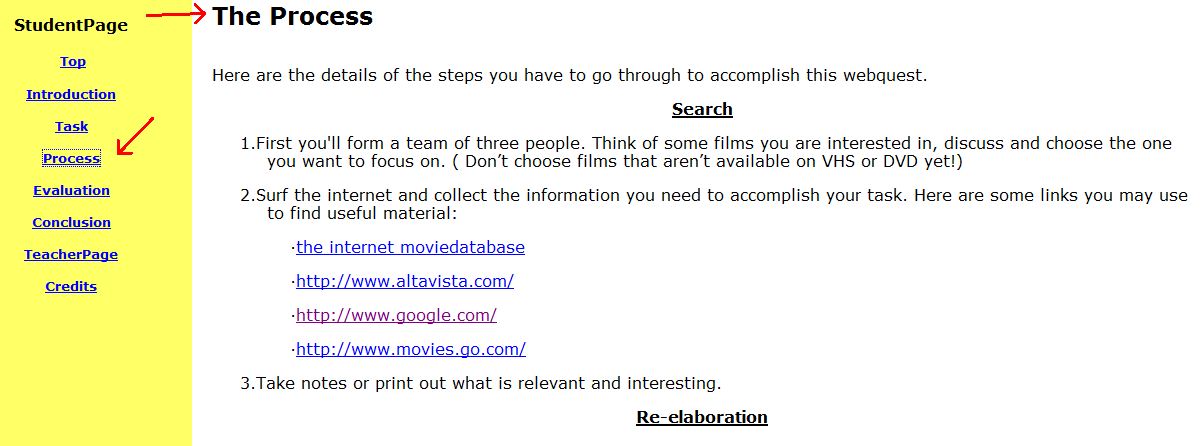 | ||
| The Process 1 |
 |
| The Process 2 |
 |
| Evaluation 1 |
 |
| Evaluation 2 |
 |
| Conclusion |


